Set the size before the page count
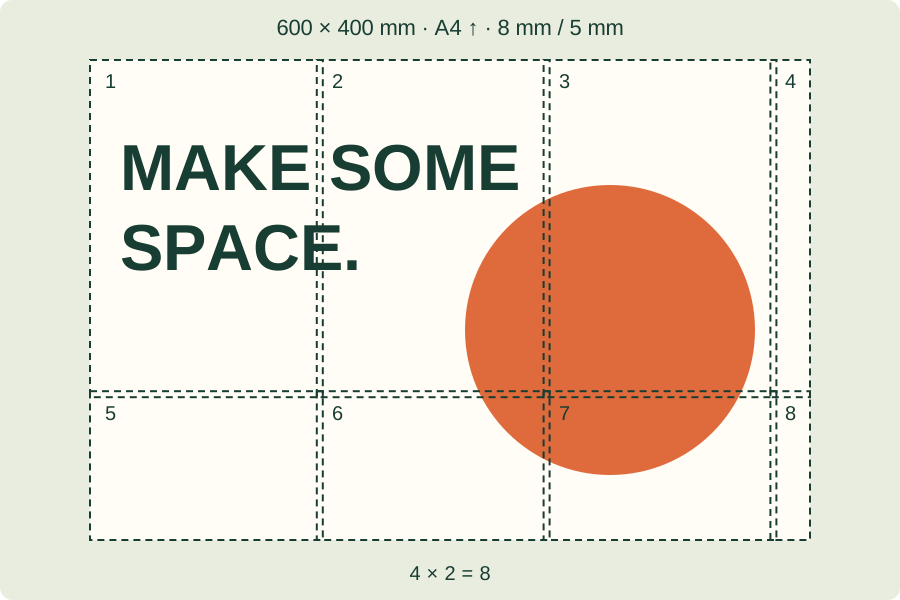
Choose A4, Letter or A3 in portrait or landscape. The poster width is a physical measurement; its height follows the image proportions. A wider poster usually needs more sheets. Margins reserve space at the paper edge, while overlap repeats a narrow part of the picture on neighbouring sheets to help assembly. Both affect the page count. If the layout exceeds 36 pages, reduce the poster width or change the paper settings.
Before choosing the final dimensions, check the source print size at your chosen PPI.
Check the exported resolution
This browser tool renders PDF artwork at up to 150 pixels per inch to keep memory use manageable. Check the displayed export rendered resolution, especially for a large poster or a small source image. This is not a promise of photographic print quality. Test one sheet at the intended viewing distance before committing paper and ink to the whole poster.
Print and assemble
The PDF includes tile labels to keep the sheets in order. Use the same paper size in the print dialog and select actual size or 100 percent. A fit-to-page setting can change the intended dimensions. Print single-sided, compare adjacent sheets, and trim only the edges needed for your overlap. Input images are limited to 20 MB and 30 megapixels; processing happens in your browser.
If the printed measurement is wrong, follow the steps to print the PDF at actual size.
Once the scale is correct, learn how to trim and join the poster sheets.
File and layout limits
Per image: 20 MB, 30 megapixels and 30,000 pixels on either side. Finished width: 5–200 cm (about 1.97–78.74 inches), with up to 36 sheets. The page limit may require a smaller width. Margins: 8–30 mm; overlap: 0–20 mm.
References & further reading
Updated: