Choose rows and columns
Use one row and two columns to cut a picture into left and right halves. Use two rows and one column for top and bottom halves. A three-by-three grid creates nine pieces. You can choose up to ten rows and ten columns, provided the source has enough pixels for the requested grid. Start with a small grid if you are unsure how the pieces will be used. To split an image into four pieces, choose two rows and two columns. A 3 × 3 grid gives nine pieces.
What happens to an odd image width?
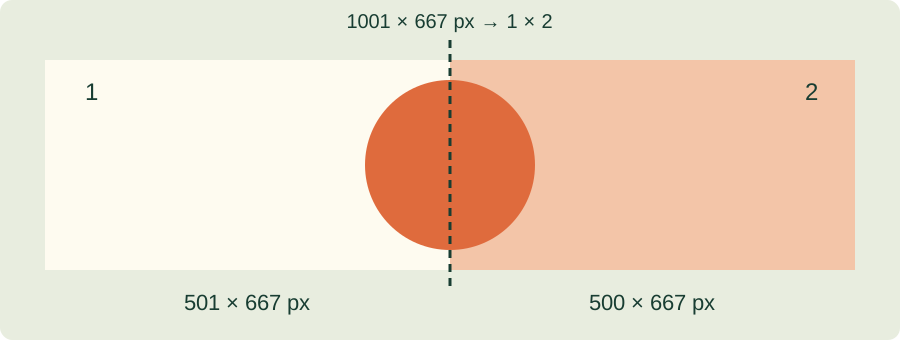
A pixel cannot be divided between two files. For a 1,001-pixel-wide image split into two columns, one piece must be one pixel wider. The splitter uses integer boundaries from the first edge to the last, so the tiles cover the source without a missing strip. Equal-looking cells may therefore have slightly different pixel dimensions.
For the one-pixel difference, read about odd dimensions and edge pieces.
Before downloading
The limit is 20 MB and 30 megapixels per image. PNG export avoids an additional lossy JPEG encoding, but it does not repair compression already present in the source. Browser decoding and color handling can also differ between applications. Keep your original file. For paper sheets with a fixed physical size and assembly overlap, use the poster maker instead.
To make a physical poster, print one image across paper sheets with margins and overlap.
Cut by pixel dimensions
Choose fixed-size tiles when another application needs a specific pixel width and height. Edge pieces retain the remaining pixels rather than stretching the image. This mode allows up to 256 pieces. Choose PNG to avoid additional lossy encoding; JPG uses a white background, while WebP supports transparency. JPG and WebP are compressed with loss.
File and layout limits
Per image: 20 MB, 30 megapixels and 30,000 pixels on either side. Grid up to 10 × 10, or up to 256 fixed-size pieces. ZIP downloads are limited to 100 MB. Choose a smaller image or JPG/WebP if the archive is too large; individual pieces can also be downloaded.
References & further reading
Updated: